TABLE OF CONTENT

Free Logo Maker That Actually Works: Try Logo Diffusion

September 2, 2025
logo-maker
Ali Rahmoun avatar
Ali Rahmoun
Founder and CEO, Logo Diffusion
Free Logo Maker That Actually Works: Try Logo Diffusion

Finding a truly free logo maker can feel like digging through endless promises. Many platforms advertise “free,” but once you start creating, you hit paywalls, watermarks, or cookie-cutter templates that don’t give your brand a unique identity.

Logo Diffusion has a free plan too, and it needs no credit card. It also has limits. Here is exactly what it includes, what it doesn’t, and what a paid plan changes.
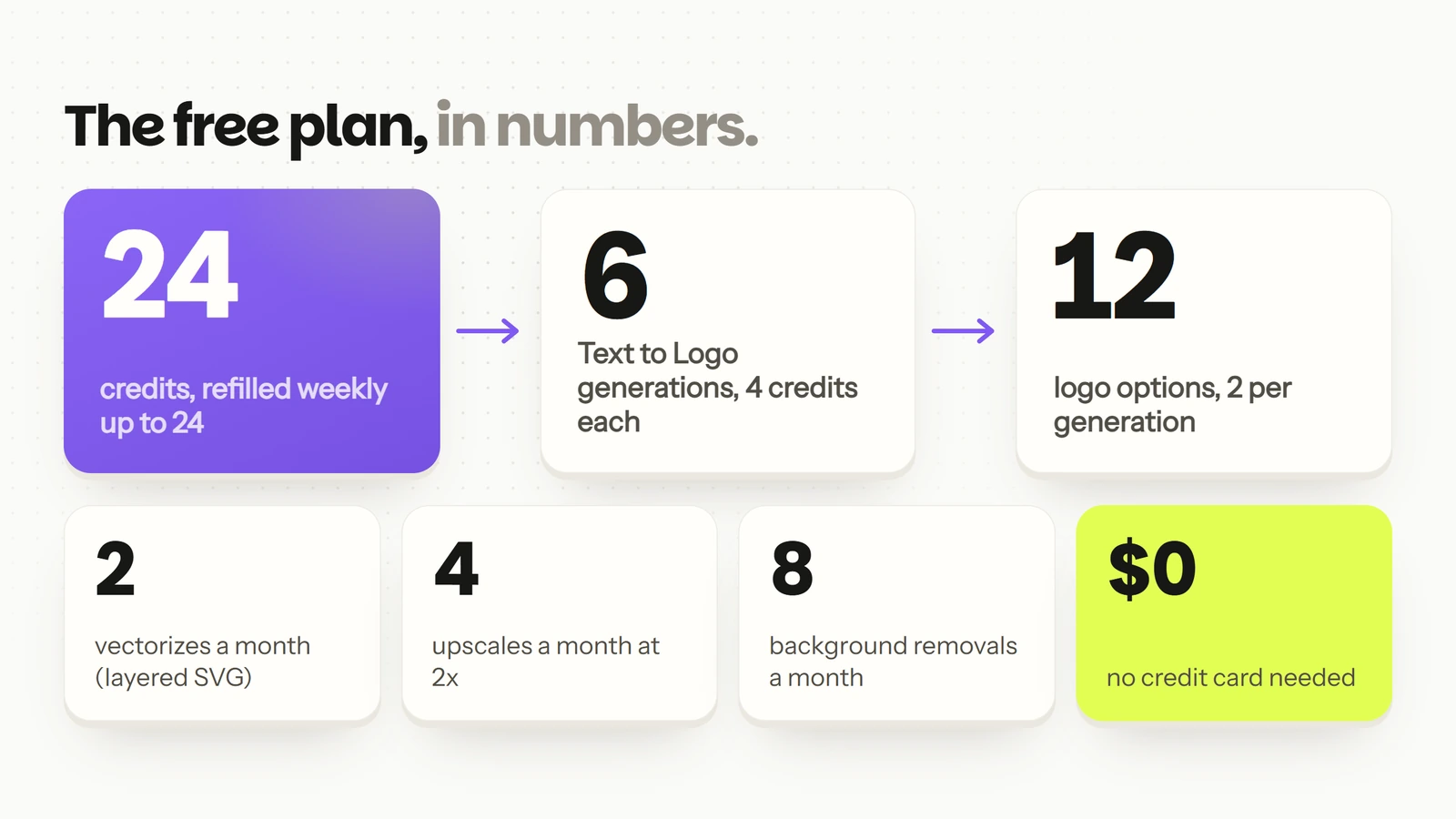
The free plan in numbers: 24 credits refilled weekly up to 24, enough for 6 Text to Logo generations and 12 logo options, plus 2 vectorizes, 4 upscales and 8 background removals a month, with no credit card
What the free plan covers. Vectorizing, upscaling and background removal spend credits from the same 24.

What Most Free Logo Makers Really Offer

If you’ve tried the usual “free logo makers,” you know the drill:

  • Template-based designs: choose from the same stock icons as everyone else.
  • No real customization: you’re limited to preset fonts and layouts.
  • PNG only: no vector file you can scale for print.

That can work for testing ideas, but the logo you end up with is built from the same parts other people use.

How Logo Diffusion’s Free Plan is Different

With Logo Diffusion, your logo isn’t built from templates. It’s generated from scratch, guided by your own ideas and prompts. The free plan gives you:

  • 24 credits, topped back up every week to a cap of 24. A Text to Logo generation costs 4 credits, so a full balance covers 6 generations.
  • 2 logo options per generation, one generation at a time.
  • All 11 logo styles in Text to Logo.
  • 2 vectorizes a month on the Default Vectorizer, which turns a logo into a layered SVG.
  • 4 upscales a month at 2×.
  • 8 background removals a month.

Vectorizing, upscaling and background removal spend credits from the same 24.

The 11 Text to Logo styles, each with its icon from the style picker: Pictorial, Mascot, Retro Mascot, Badge/Crest, Cartoon, Logo Type, Abstract, Line Art, Icon/Emoji, Engraved and Monogram
The 11 Text to Logo styles, each with the icon it has in the style picker. Every style is open on the free plan.

What’s not included in the free plan: a commercial use license, 1024px downloads with no watermark, the HQ vectorizer and 4× upscales. Free downloads are 512 by 512 pixels and carry a watermark. The free plan is there to show you how Logo Diffusion handles your idea before you pay.

Make your logo with Logo Diffusion. Describe it, sketch it or upload an image, then turn it into a layered SVG with Vectorize. Try it for free.

Why Vector Export Matters

One of the biggest gaps in most free logo makers is vector export. Without it, your logo won’t scale for print, signage, or high-resolution use.

Logo Diffusion includes two vectorizes a month in the free plan, so you can check the SVG before you upgrade. The SVG is layered, with real vector paths, so you can take it into Illustrator or any design workflow without rebuilding it from scratch.
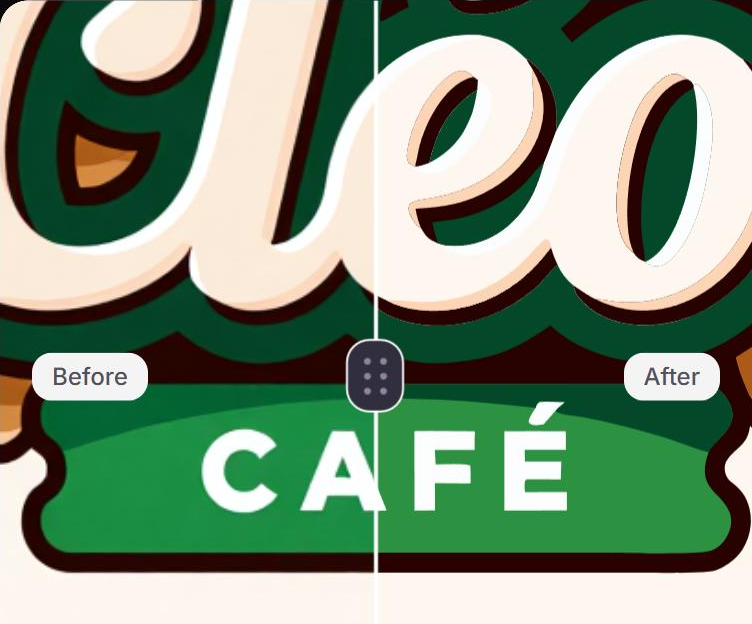
The Cleo cafe logo in the Logo Diffusion vectorizer, zoomed in on the ribbon with the divider between the A and the F of CAFÉ: the Before side, the PNG, has soft edges and the After side, the SVG, has sharp ones
The Cleo cafe logo in Vectorize with the Default Vectorizer, the one the free plan includes, zoomed in all the way (2.5 times) inside the app. Before, left of the divider, is the PNG, with soft edges. After, right of it, is the SVG, with sharp ones.

From Idea to Logo in Minutes

Here’s how fast it works:

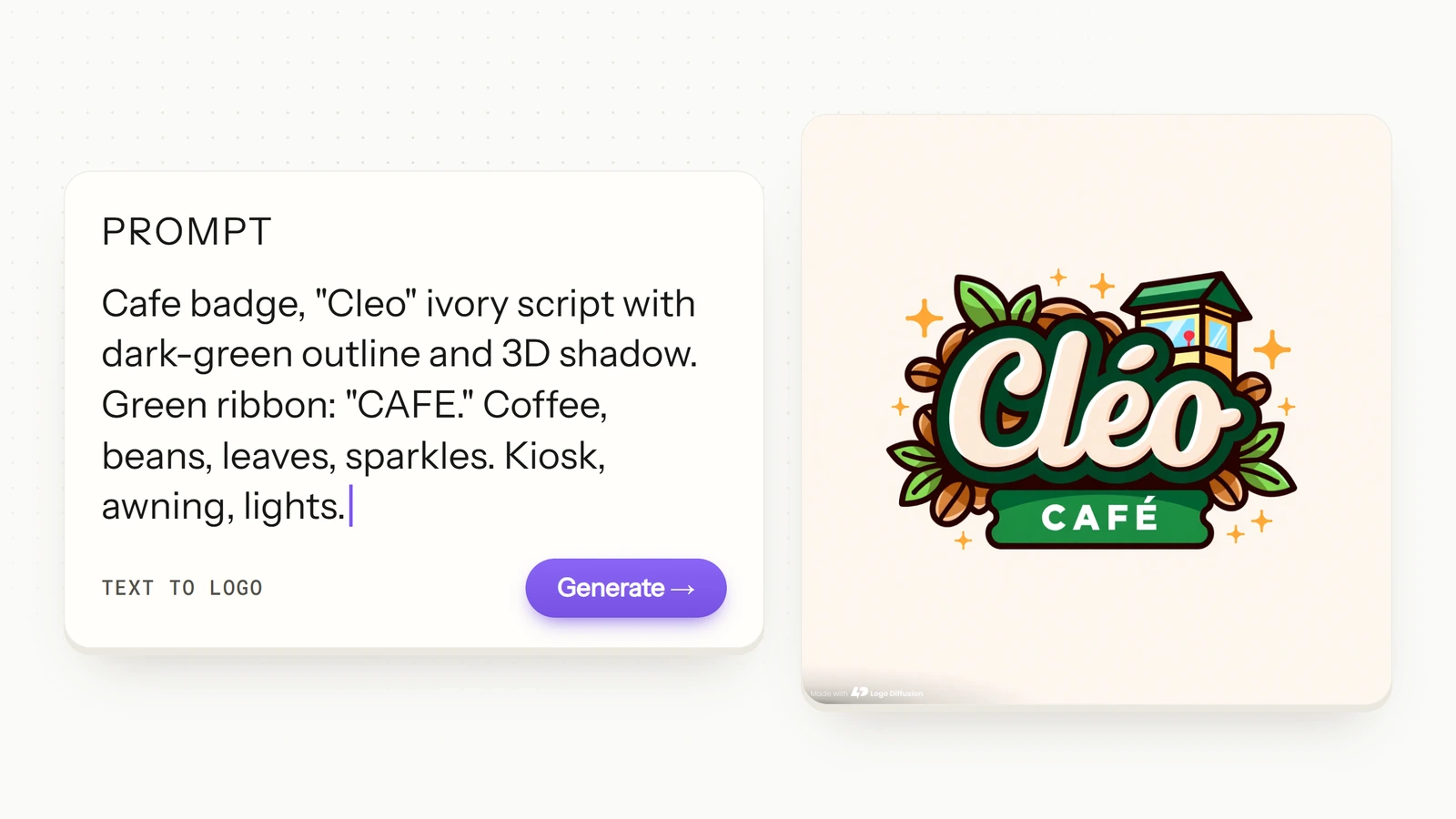
  1. Describe your idea: the name in quotation marks, the colors and the objects you want. The Cleo cafe badge below came from this prompt: “Cafe badge, "Cleo" ivory script with dark-green outline and 3D shadow. Green ribbon: "CAFE." Coffee, beans, leaves, sparkles. Kiosk, awning, lights.”
A Text to Logo prompt for a cafe badge named Cleo next to the logo it made: Cleo in ivory script with a dark green outline, a green CAFE ribbon, coffee beans, leaves and a small kiosk with an awning
A cafe logo from the Logo Diffusion gallery, next to the exact prompt that made it. The name, the colors and every object in the logo came from the prompt.
  1. Generate designs: Logo Diffusion returns logo options in about a minute, 2 on the free plan and 4 on paid plans. Pick the one closest to what you want.
  1. Refine or export: describe one change in the Magic Editor, download a PNG, or turn the logo into an SVG with Vectorize. For Cleo, the instruction was “change the name from Cléo to Lola, keep everything else the same.”
The Cleo cafe logo before and after one Magic Editor instruction: the script name reads Cléo before and Lola after, and the CAFÉ ribbon, the kiosk, the coffee beans and the leaves stay the same
One Magic Editor instruction changed the name from Cléo to Lola and kept everything else. An edit at the default Base setting costs 5 credits.

Make It Brand-Ready Before You Use It

A logo you can use on a sign, a site and a shirt passes three checks first.

  • Check it small. Shrink it to the size of a browser tab icon or a profile picture. If the details turn to mush, ask the Magic Editor for a simpler version for small spaces, such as the picture without the words.
  • Change one thing at a time. Put one change in each Magic Editor instruction and check the result before the next one, so the logo still looks like your logo. The Lola edit above is one instruction.
  • Keep the right files. An SVG from Vectorize as the master file you edit and print from, and a PNG for slides and social posts (Background Remover clears the background when you need it transparent). Light, dark and one-color versions cover most backgrounds; the export checklist walks through each one on a single logo.

Free to Start, Scalable When You’re Ready

The free plan is designed to let you experiment and see what’s possible. A paid plan adds:

  • A commercial use license for every logo you generate on it, and it stays valid if you cancel.
  • Downloads with no watermark: a 1024px PNG, and a layered SVG through Vectorize.
  • 4 options per generation and more credits: Basic is 1,000 credits a month for $24, Pro is 2,500 for $49, Elite is 6,000 for $99. Annual billing gives you two months free.
  • The HQ vectorizer, plus 4× upscales on Pro and Elite.
Table comparing the free plan with the paid plans on options per generation, credits, downloads, commercial license, vectorizer, upscale and price
Basic, Pro and Elite differ in credits and price. 4x upscales come with Pro and Elite.

FAQ

Is the Logo Diffusion free plan really free?

Yes. It needs no credit card and refills to 24 credits every week. A Text to Logo generation costs 4 credits and returns 2 options. Free downloads are 512 by 512 pixels with a watermark.

Can I get an SVG on the free plan?

Yes, twice a month with the Default Vectorizer. Each vectorize takes 5 credits from the same 24. Vectorizer HQ is on paid plans.

What files does a brand-ready logo need?

An SVG as the master file, a PNG for quick use, and light, dark and one-color versions for different backgrounds. Check the logo at small sizes before you use it anywhere.

Can I use a logo from the free plan for my business?

Free-plan generations carry no commercial use license. Every logo made on a paid plan is licensed for commercial use, and the license stays valid if you cancel.

Ready to Try It?

Don’t settle for template-driven “free logo makers” that lock your creativity.

Start with Logo Diffusion’s free plan: 24 credits, no credit card.

👉 Get started free with Logo Diffusion

Ali Rahmoun avatar
Ali Rahmoun
Founder and CEO, Logo Diffusion
ABOUT THE AUTHOR

Ali Rahmoun is a brand designer and 3D illustrator who has been building logos and brand identities since 2006. In 2016 he founded Sports Templates, whose branding and uniform templates have been used by the Pittsburgh Steelers, the Minnesota Timberwolves and ESPN, where he also worked on custom 3D graphics. In 2023 he founded Logo Diffusion, training its AI models on his own branding projects and on what makes a logo work: clean shapes, strong type and a file you can actually use. He writes here about logo design, branding and how to get professional results from AI without handing over the creative decisions.

View all author's posts