Logo Diffusion vs LogoAI: Which AI Logo Tool Should You Choose?

This page puts LogoAI and Logo Diffusion side by side: one shared brief first, then logo quality, editing control, workflow and price. LogoAI is aimed at small businesses that want a logo and basic brand assets with minimal setup. Its guided process and bundled brand kits suit someone who only needs a single logo and a few supporting materials.
The shared brief is Royal Irons, a made-up golf team. The other logos below come from Logo Diffusion itself: two gallery logos next to the prompts that produced them, and one of them edited and vectorized inside the app.
What is Logo Diffusion?
Logo Diffusion makes logos from a text prompt, a sketch or an image. Text to Logo offers 11 logo styles plus Auto, which picks a style from your words, and each generation returns 4 options on a paid plan or 2 on the free plan. From there, the Magic Editor changes a finished logo from a typed instruction, and Vectorize turns it into a layered SVG.
A small bakery's mascot and name fit in three short sentences:
A cute smiling loaf of bread wearing a chef hat, holding a whisk. "HAHA NOYA" text below. Bread looking towards the viewer.

What is LogoAI?
LogoAI.com generates logo suggestions from your brand name and industry preferences. It uses a mix of AI logic and structured icon, font, and color libraries to produce multiple logo variations. After selecting a design, you can customize fonts, icons, and colors and purchase branding kits with stationery, business cards, and social templates. It is aimed at small businesses.
Comparison table
| Feature | Logo Diffusion | LogoAI |
|---|---|---|
| Core purpose | Making and editing logos | Quick logo creation + brand kits |
| Generation style | Text prompt, sketch or image | AI-assisted templates |
| Vectors | Yes layered SVG through Vectorize | Higher-tier packages |
| Editing | Magic Editor, edits from a text instruction | Basic editor |
| Mockups | 70+ mockups, each generated fresh for your logo | Static templates |
| Pricing | Free, then $24, $49 or $99 a month | ~$29 / $59 / $99 one-time |
The Royal Irons test: one brief, both tools
Each tool was given the same brief, a logo for a fictional golf team called Royal Irons, and neither result was edited afterward. In the image, LogoAI's three results are on the left and Logo Diffusion's three are on the right.
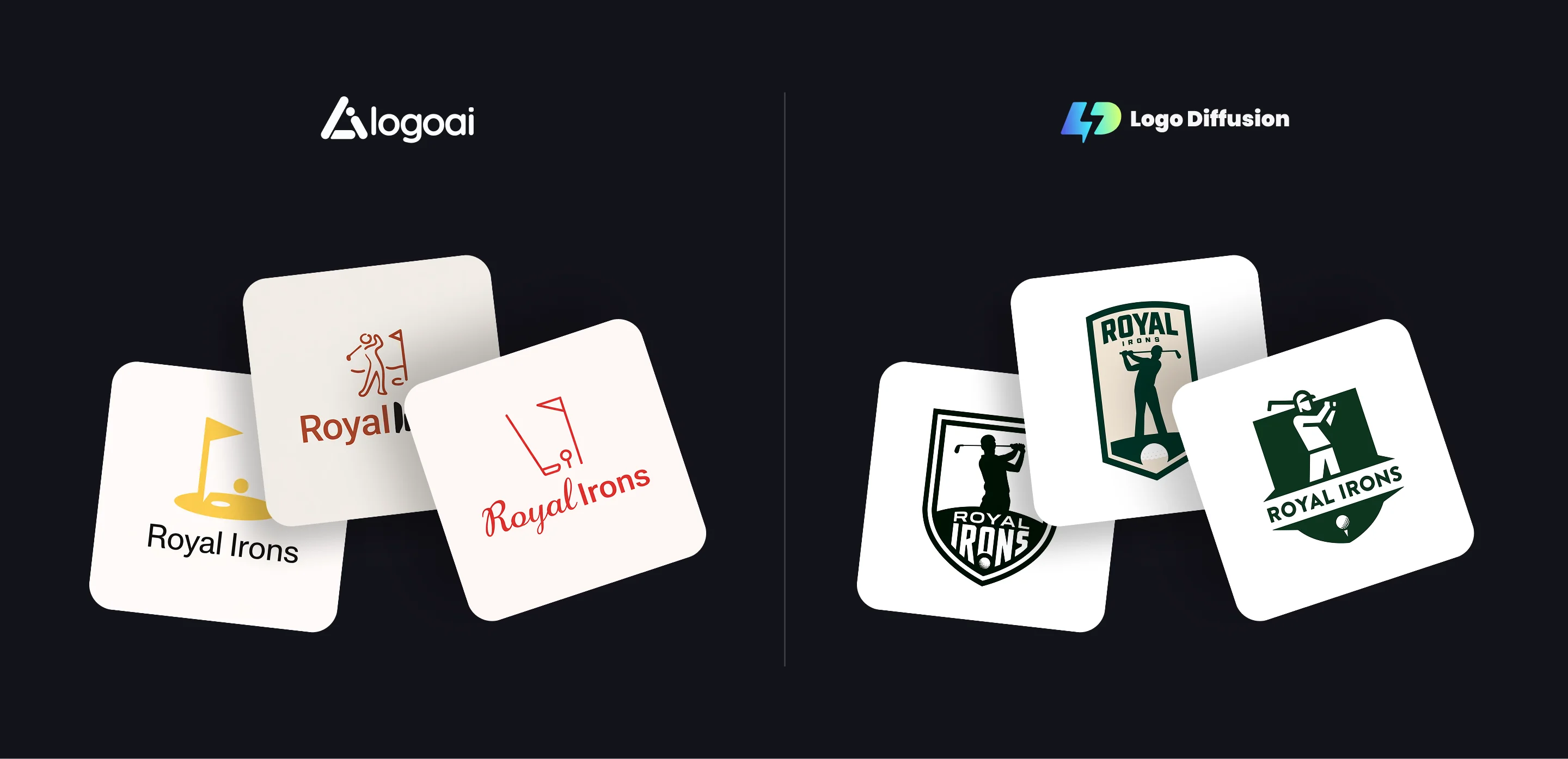
LogoAI's three are each a small golf icon above the name, on an off-white card:
- A solid yellow flag and ball on a yellow putting green, over "Royal Irons" in plain black letters.
- A thin rust-colored line drawing of a golfer and a flag, over the name in bold rust letters.
- A red line drawing of a flag, a club and a ball on a tee, over "Royal" in red script and "Irons" in red sans serif.
Logo Diffusion's three are team badges, each in one dark green with white or cream:
- A double-outlined white shield with a golfer silhouette, the club resting behind his shoulders, above a green base where a thin ROYAL sits over a heavy IRONS and a golf ball.
- A tall cream shield topped by ROYAL in thick green capitals, IRONS in small spaced letters underneath, and a green golfer holding his finish on a mound with a ball set into it.
- A solid green shield with a white geometric golfer wearing a cap, a white band reading ROYAL IRONS, and a ball on a tee at the bottom point.
Every LogoAI result uses a flag, and each keeps its icon and its name as two separate pieces. Every Logo Diffusion result draws the golfer, the ball and the name into one badge.
Logo quality and originality
Text to Logo builds the logo from the words in your prompt, so the letter and the picture can share one shape. This prompt puts a chess piece inside a letter:
Chess piece merges with an "M" in negative space, angled view, minimalistic design.

LogoAI
- Generates logos from a structured library of icons and typefaces.
- Originality is limited.
- Different users may end up with visually similar icons.
Customization and control
Picking the style and writing the prompt set most of the logo. For a logo you already have, the Magic Editor changes only what an instruction names. This edit to the HAHA NOYA logo ran at the default Base setting and cost 5 credits:
replace the whisk with a wooden rolling pin, keep the bread, the chef hat, the smile, the HAHA NOYA lettering and the colors the same

LogoAI
- Editor for changing fonts, spacing, colors, and icons.
- Shallow for complex refinement.
- No selective AI editing or advanced shaping tools.
Make your logo with Logo Diffusion. Describe it, sketch it or upload an image, then turn it into a layered SVG with Vectorize. Try it for free.
Workflow and production readiness
The steps after the first logo stay in the same app:
- Vectorize redraws the PNG as a layered SVG. The Default vectorizer costs 5 credits, and the HQ vectorizer, on paid plans, costs 8.
- Logo Variations returns 4 variations of a finished logo, and its default Auto mode matches the concept and style of the original.
- Logo System in the Magic Editor turns one logo into wordmark, lettermark, emblem and symbol versions.
- Mockups offers 70+ ready-made scenes, each generated new around the logo you upload.

LogoAI
- Produces brand kits.
- Includes social media templates and business cards.
- No advanced mockups, no vector rebuilding.
LogoAI is aimed at a quick starter kit.
Pricing and value
Logo Diffusion
- Free: $0 (24 credits, refilled weekly, no credit card required)
- Basic: $24 a month (1,000 credits a month, commercial license for logos made on the plan)
- Pro: $49 a month (2,500 credits a month)
- Elite: $99 a month (6,000 credits a month)
Every tool draws on the same credit balance: a paid Text to Logo generation of 4 options uses 8 credits, a Magic Editor edit at Base uses 5, and a vectorize uses 5 or 8. What the free plan covers is laid out in our free logo maker guide.
LogoAI
- One-time payments:
- ~$29 for basic files
- ~$59 for more formats
- ~$99 for brand identity bundles
LogoAI charges once per logo package.
Choose LogoAI if
- You need one logo and a bundled kit of stationery, business cards and social templates.
- You prefer a one-time payment to a subscription.
- You want to start from your brand name and industry rather than a prompt or a sketch.
Choose Logo Diffusion if
- You want to start from a sketch or a photo of a real object.
- You want to edit one logo over many rounds with the Magic Editor.
- You need a layered SVG and a transparent PNG.
- You want to try it free, with 24 credits refilled weekly.
Frequently asked questions
Do both Logo Diffusion and LogoAI offer vector/SVG exports?
Logo Diffusion's download saves a PNG, and Vectorize turns that PNG into a layered SVG for 5 credits with the Default vectorizer or 8 with the HQ vectorizer on paid plans. Paid downloads carry no watermark. LogoAI reserves more advanced formats for its higher packages.
Logo Diffusion's download saves a PNG, and Vectorize turns that PNG into a layered SVG for 5 credits with the Default vectorizer or 8 with the HQ vectorizer on paid plans. Paid downloads carry no watermark. LogoAI reserves more advanced formats for its higher packages.
Which option is better value if I only need one logo once?
LogoAI sells one-time packages, so a single logo can cost less there. Logo Diffusion's free plan has 24 credits, refilled weekly, with no credit card, enough for up to 12 logos from each refill. Paid plans start at $24 a month.
LogoAI sells one-time packages, so a single logo can cost less there. Logo Diffusion's free plan has 24 credits, refilled weekly, with no credit card, enough for up to 12 logos from each refill. Paid plans start at $24 a month.
Which tool is better for fast brand kits (social templates, cards, basic assets)?
LogoAI is built around bundled templates and ready-made formats for brand kits. Logo Diffusion works on the logo and what goes around it: the Magic Editor's Elements include Brand Presentation and Logo to Merch Set.
LogoAI is built around bundled templates and ready-made formats for brand kits. Logo Diffusion works on the logo and what goes around it: the Magic Editor's Elements include Brand Presentation and Logo to Merch Set.
Can I use a Logo Diffusion logo in my business?
Yes, if you made it on a paid plan. Those logos carry a commercial license that stays after the subscription ends, while free-plan generations carry none.
Yes, if you made it on a paid plan. Those logos carry a commercial license that stays after the subscription ends, while free-plan generations carry none.


Start with the material prompt.
The honest test is a real project, not a demo. 24 credits, no card.